How to review a contract PDF for payments, dates, and obligations
Start with money, then check dates and timing, then renewal or termination wording, then obligations and responsibilities. For every important item, read the surrounding wording in the original contract before relying on it. This is a factual first pass, not legal analysis, and it cannot prove that nothing important was missed.
1. Find payments and amounts
Start with the parts of the contract that define what is paid, when, and under what conditions.
Look for:
- prices, fees, deposits, advance payments, discounts, credits, or other stated amounts;
- payment schedules and due dates;
- wording tied to invoices, milestones, delivery, or acceptance;
- late-payment charges or interest, if stated;
- conditions that change when a payment is due or when an amount applies.
Check each amount together with its condition. A number on its own can be misleading if the surrounding clause limits when it applies.
Do not treat this step as a conclusion about whether a term is fair, enforceable, or commercially reasonable. The goal is to locate the contract passages that contain monetary terms and verify what they actually say.
2. Record dates, deadlines, and notice periods
Check:
- start and end dates;
- delivery dates, milestones, and other deadlines;
- notice periods;
- renewal dates or automatic-renewal windows;
- termination timing and stated notice conditions.
Check each date together with the action it depends on. For example, a 30-day period can mean different things depending on whether it runs from an invoice, notice, delivery, or the end of the contract term.
If renewal or termination wording points to another definition or section, check that reference before recording a conclusion.
3. Identify obligations and who must perform them
Look for explicit obligations and responsibilities. Words such as must, shall, is required to, will provide, and similar wording can point to an obligation, but the surrounding sentence and definitions still matter.
For each important obligation, check:
- who must act;
- what action is required;
- when it must be performed;
- which conditions or exceptions apply;
- which document, service, payment, or notice the obligation relates to.
Do not turn a located phrase into a legal conclusion. Other parts of the contract may qualify it, and a defined term can change how the sentence should be read.
4. Verify every important finding in context
Do not rely on a keyword, amount, or isolated sentence alone. Return to the original PDF and read the full clause, nearby definitions, and any conditions it references.
A useful check is:
- locate the exact wording;
- confirm the page;
- read the surrounding paragraph or clause;
- check a cross-reference if it changes the condition;
- record only what the text actually says.
If two clauses appear inconsistent, or if the meaning depends on legal interpretation, negotiation, or risk judgement, investigate further or seek appropriate professional advice rather than drawing a conclusion from the first match.
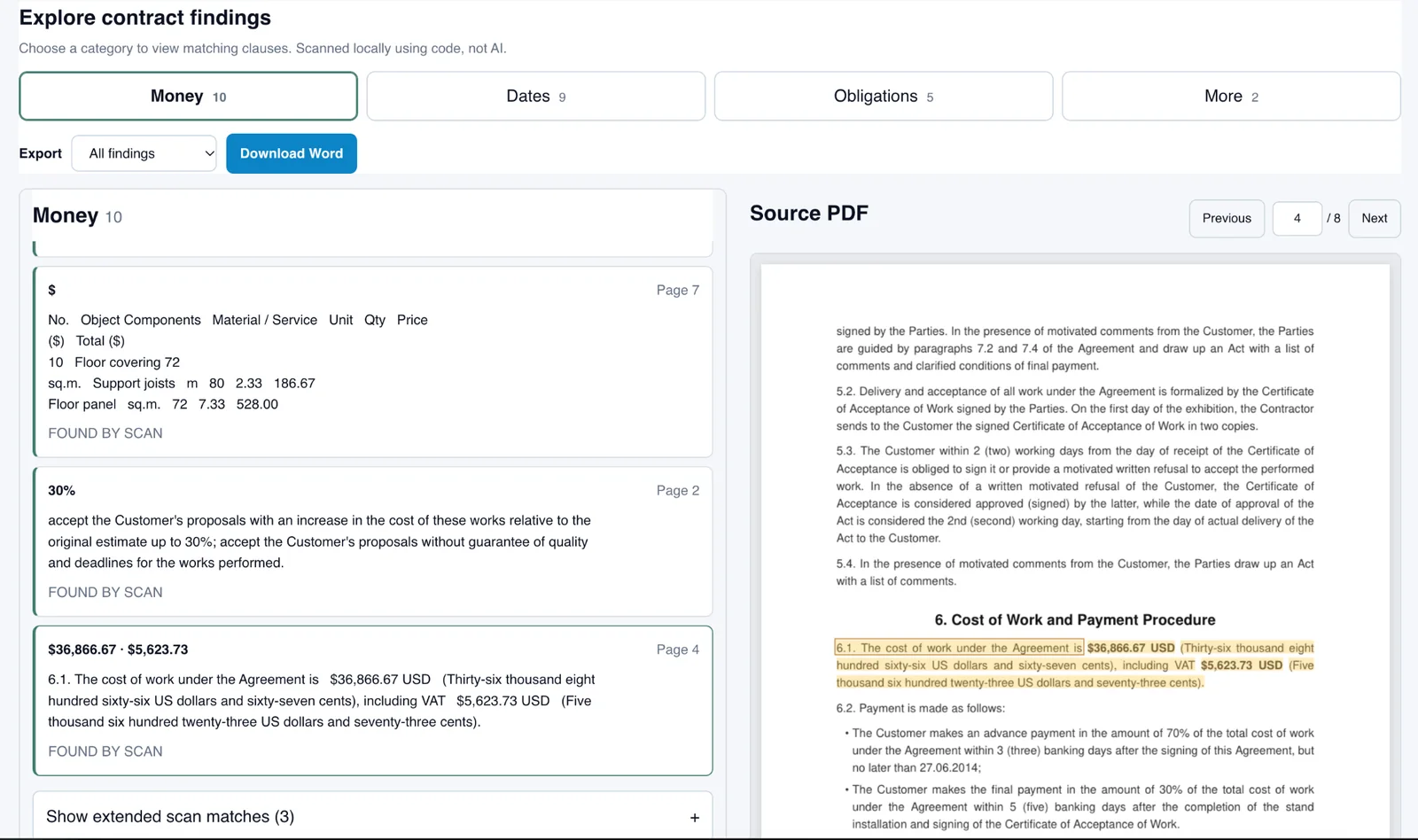
If you want a deterministic aid after the manual first pass, you can scan one text-based contract PDF with Contract Facts. It surfaces candidate findings with source quotes and pages; the user still verifies the original wording.
5. Download the findings to Word and check them against the contract
After reviewing the results in Contract Facts, download the findings to Word. You can export all findings or only the current category, such as Money, Dates, or Obligations.
Use the downloaded file as a working checklist against the original contract. For each important finding:
- check the quote and cited page;
- open the corresponding place in the source PDF;
- read the full clause with the surrounding context;
- check related conditions, exceptions, and cross-references;
- mark wording that needs further review.
The export brings surfaced fragments together in one document, but it does not turn them into a complete contract review or a legal opinion. If a needed term is absent from the downloaded findings, that does not prove the term is absent from the source contract.
Do the final verification against the PDF itself. The Word file contains scan results; the original contract remains the source for wording and context.
Optional next step
Open Contract Facts to scan one text-based contract PDF for candidate payment, date, and obligation wording with source quotes and pages.